Every PDF job, in one place. Without the license bill.
Beezifi PDF is a full PDF workbench that runs in your browser. Comment and review, fill in and sign forms, organize, combine and split pages, redact for real, protect with passwords, make scans searchable and export to Word. Your whole team works on the same live document.
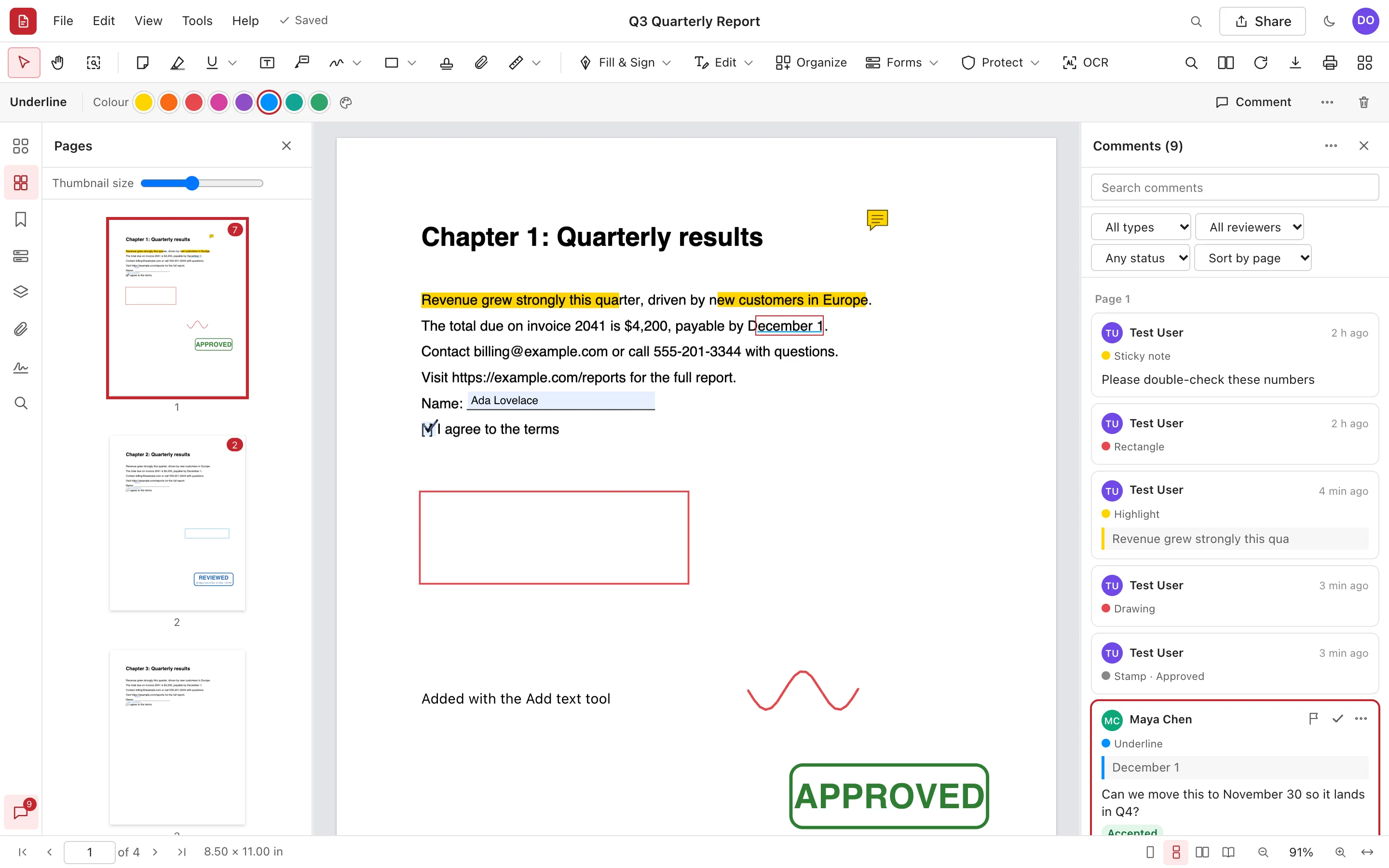
Real screenshot. Maya's comment thread is on the right: her question, a reply and an Accepted status.
200+tools and commands
Livereview with your team
AES-256password protection
$0per-seat license fees
Features
Everything you open a PDF editor for
Not a viewer with a few buttons: a real PDF editor whose output opens the same in every reader.
Review together, in real time
Highlight, underline, strike out, add notes, text boxes, callouts, drawings, shapes, clouds, measurements and stamps. Every comment is a thread: reply, set a status, tick it off, lock it.
20 kinds of comments, saved as standard PDF annotations
See teammates' selections live; everything autosaves
Summarize, import and export comments (XFDF)
Q3 Quarterly Report
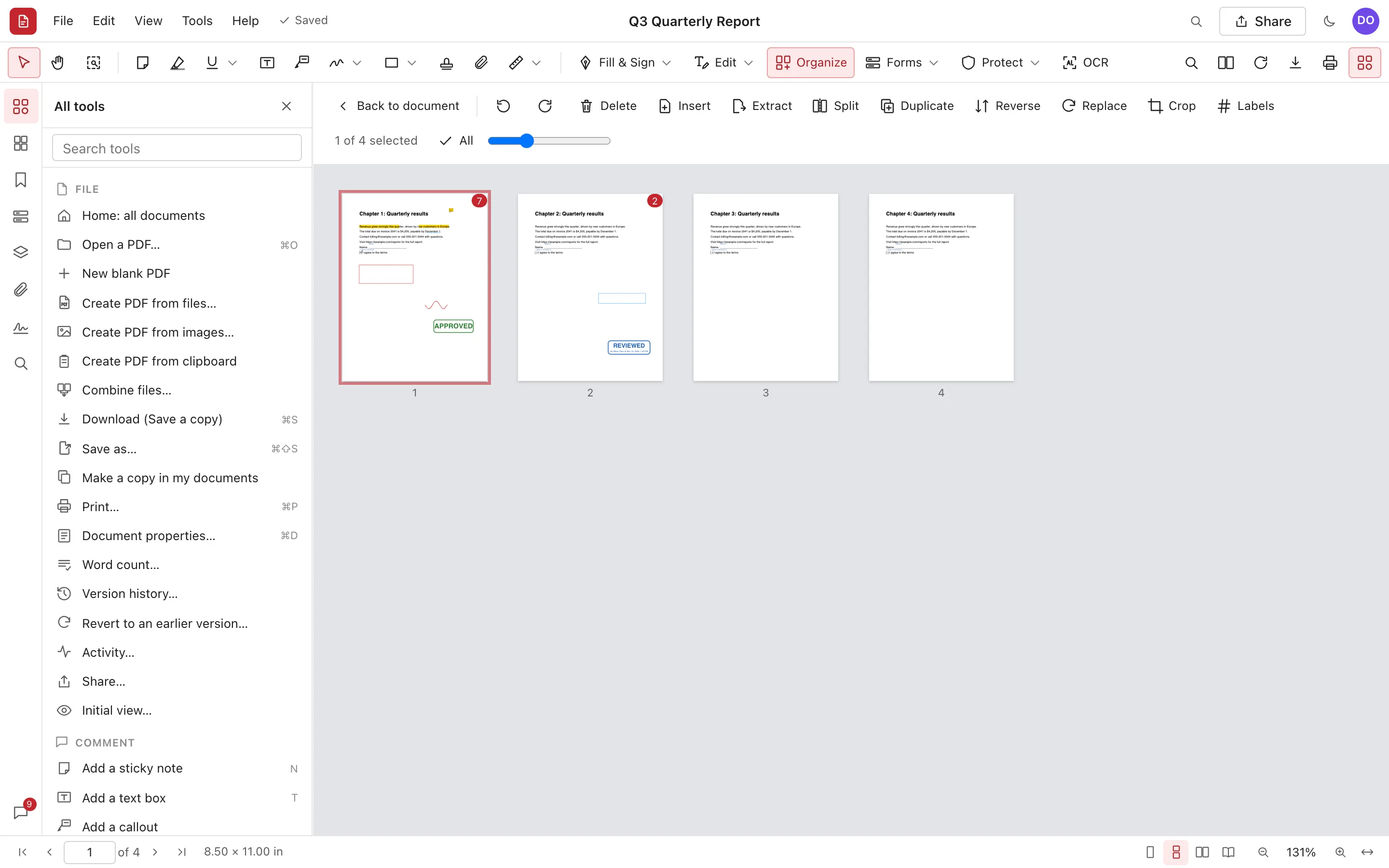
Organize pages like cards on a table
See every page at once. Drag to reorder, rotate, delete, duplicate, insert blank pages or pages from other files, crop, and number pages with their own labels.
Combine any number of files, each under its own bookmark
Extract pages or split every n pages, at bookmarks or into parts
Copy and paste pages between documents
Organize pages
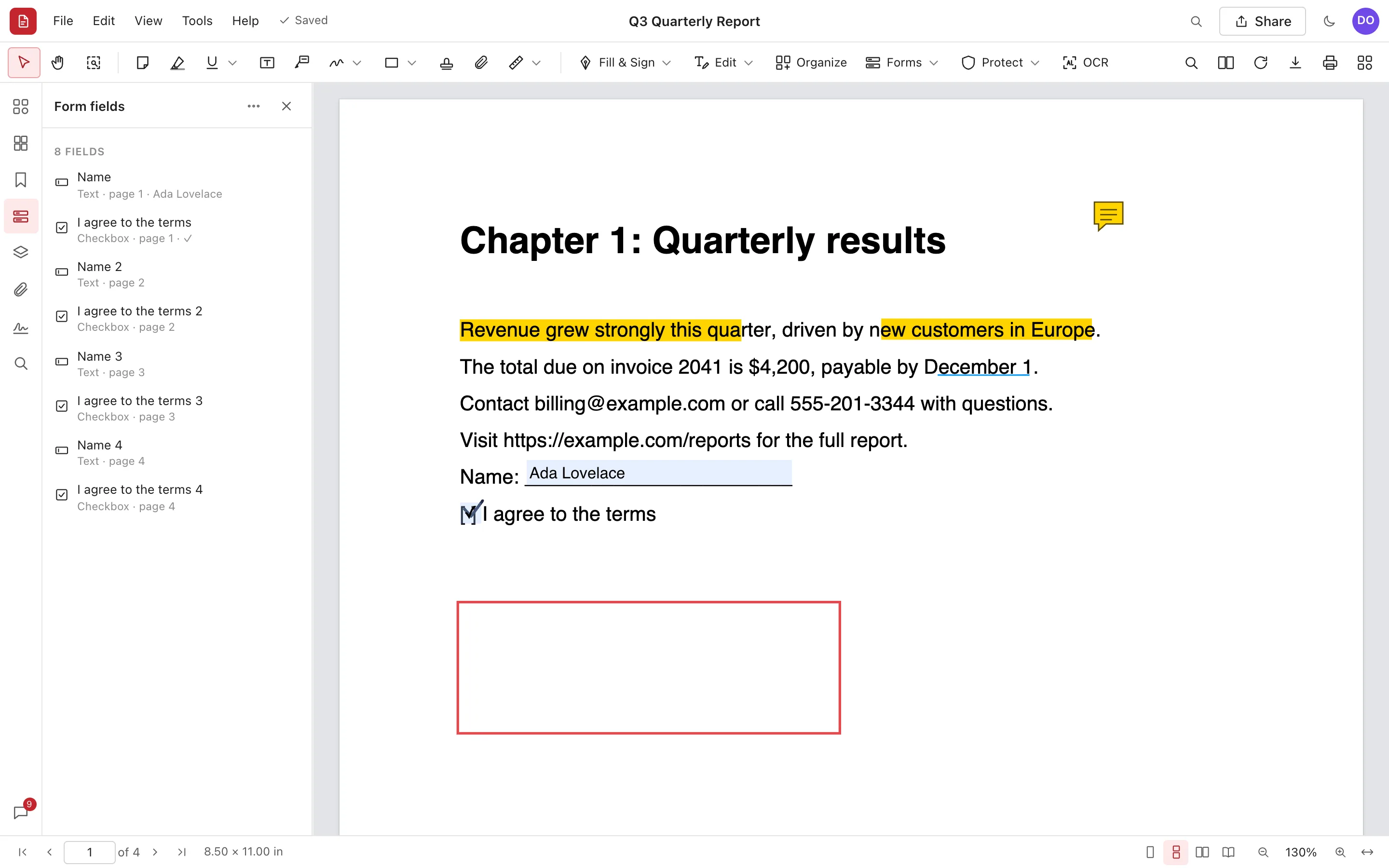
Fill in, sign and send forms
Fill any PDF form, or let Beezifi PDF detect the blanks for you. Add your signature, initials, ticks and dates with Fill & Sign, or sign with a digital ID that anyone can validate.
Build forms with 9 field types, tab order and calculations-free validation
Import, export and merge form data (FDF, XFDF, JSON, CSV)
Digital signatures and certification with your own digital IDs
Form fields
Find anything, with one keystroke
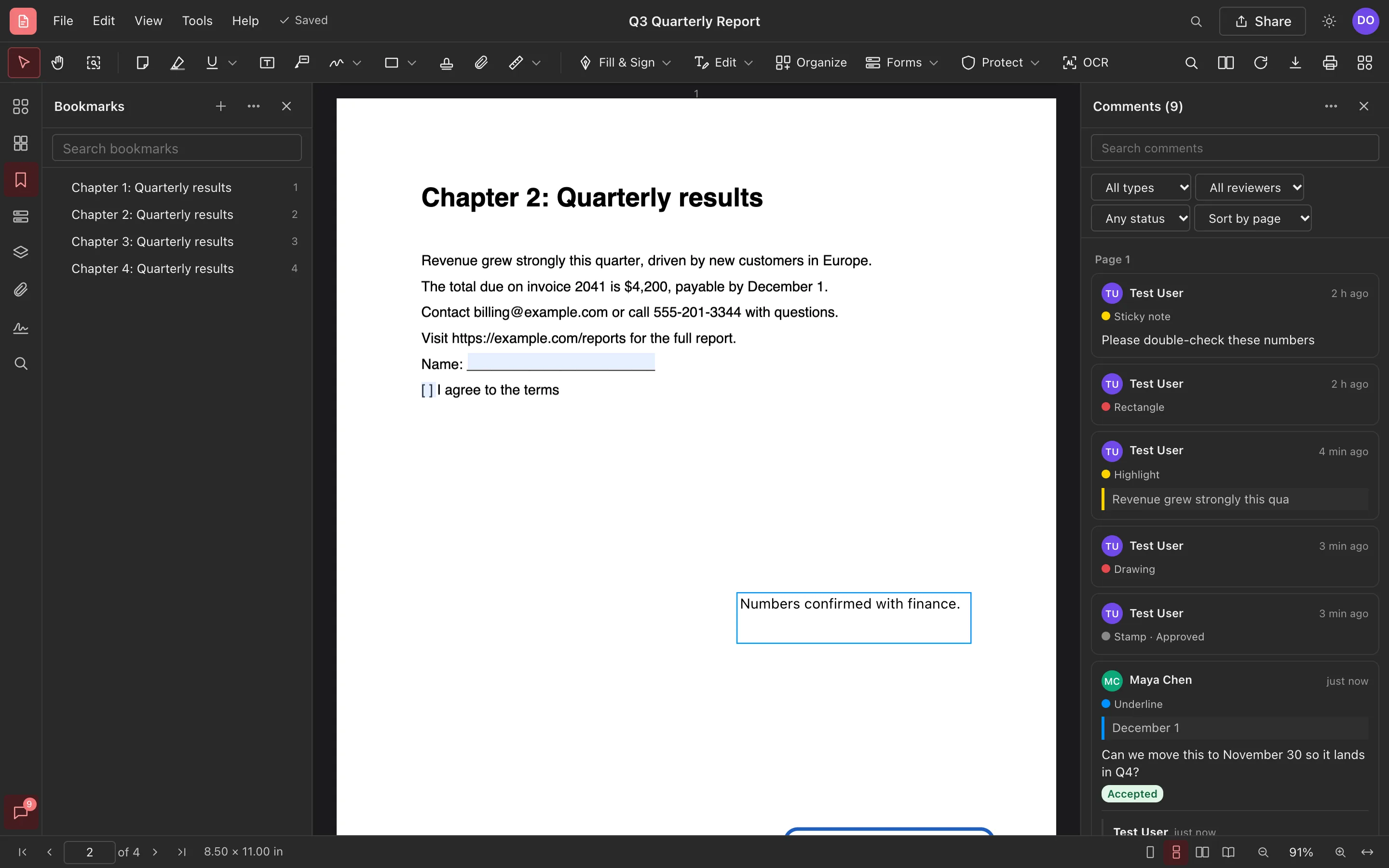
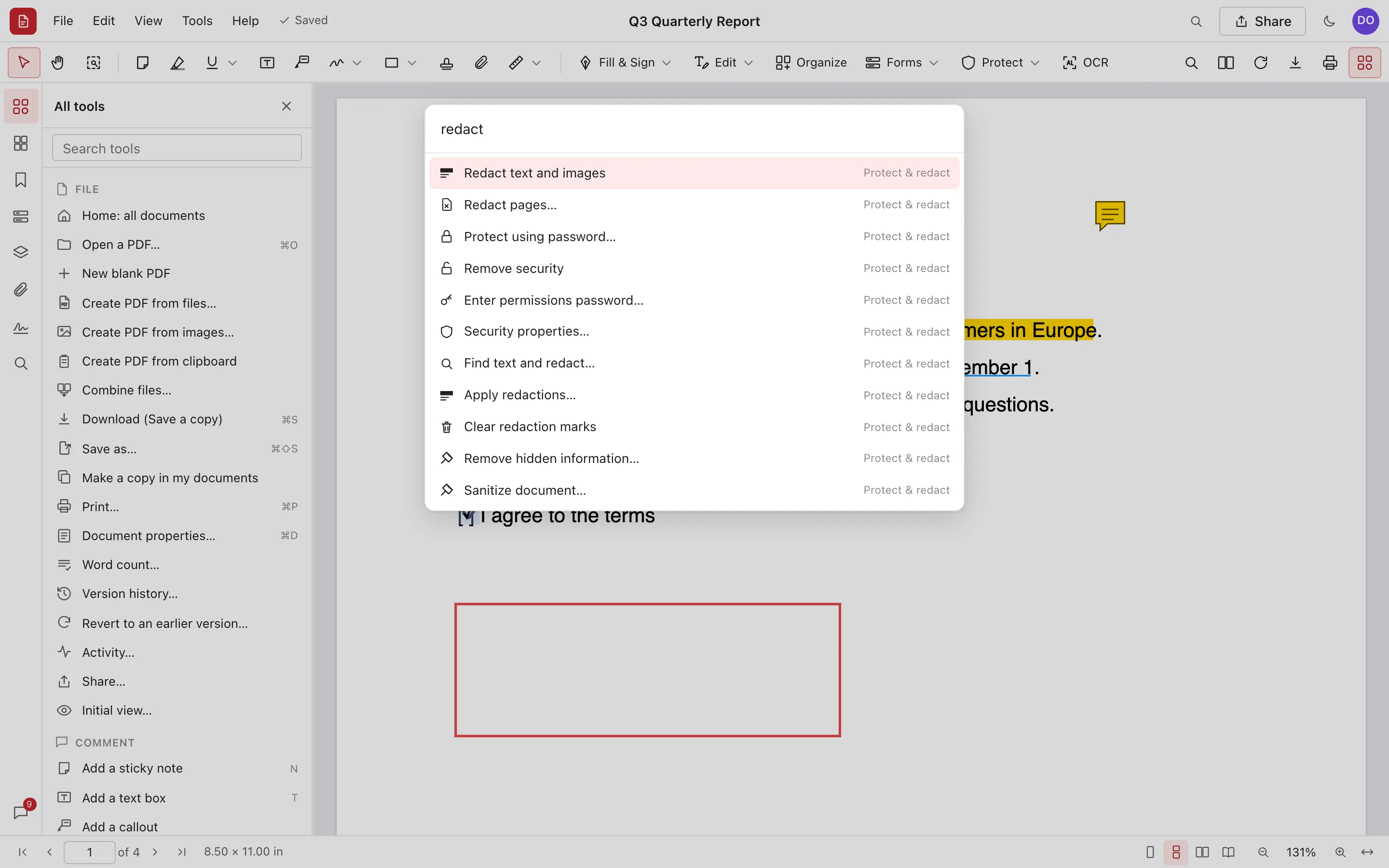
Press Ctrl+K (⌘K) to search every tool and command. Search a document as you type, or search the text of every document you can open.
Find and replace, whole words, case and patterns
Search & redact emails, phone numbers, card numbers and more
Recognize text in scans (OCR) in 29 languages, with a word-by-word review
Command palette
All tools
The whole toolbox, in your browser
Redact for real
Marked text, pictures and drawings are removed from the file, not just covered. Earlier versions holding them are removed too.
Passwords and permissions
Protect with AES-256, restrict printing, copying and changes, and open protected PDFs with their passwords.
Scan and OCR
Straighten, clean up and recognize scans so they can be searched and copied. Check each word before it's applied.
Export anywhere
Word, PowerPoint, HTML, RTF, Markdown, text and images. Or reduce the file size before sending.
Headers, watermarks, Bates
Page numbers, headers and footers, watermarks, backgrounds, Bates numbering and printer marks.
Compare files
See what changed between two documents or two versions, and mark the differences as comments.
Accessibility checker
Titles, language, alternate text, tab order and contrast, with one-click fixes.
Measure
Distances, perimeters and areas at your drawing's scale, exported to a spreadsheet.
Action Wizard
Run several steps at once: prepare for distribution, optimize scans, make accessible, or your own.
Any device · On the go
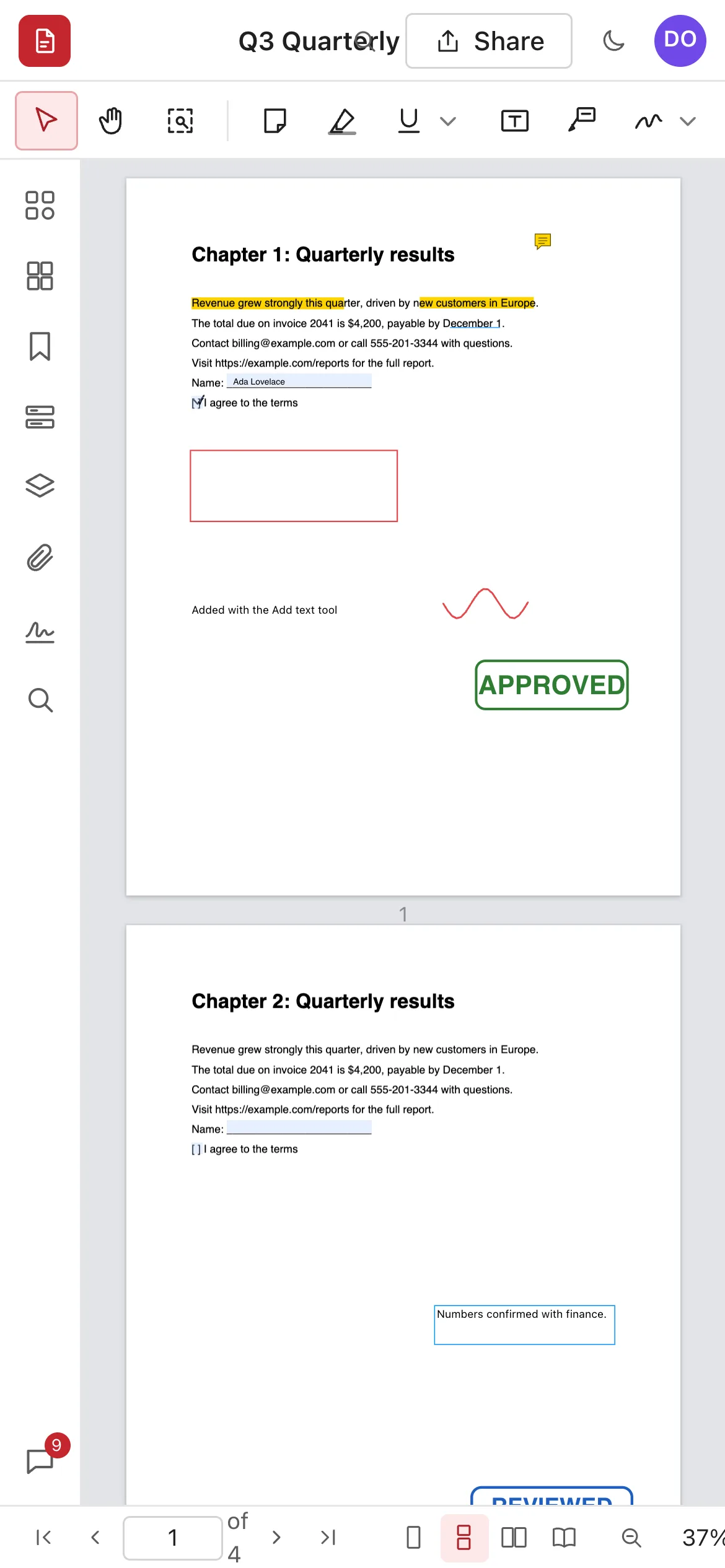
Your documents go where you go
There's nothing to install and no license tied to one machine. Sign in from any modern browser on Windows, Mac, Linux, Chromebook, iPad, iPhone or Android.
PDF editor subscriptions are paid per person, every month. Enter what you pay today and see what it costs your business.
Your license spend$17,991
Beezifi PDF license fees$0
You keep$17,991over 3 years
Compare
Why teams switch to Beezifi PDF
Beezifi PDF
Typical licensed desktop PDF editor
License fees
None
Paid per user, renewed every year
Installation
None, it runs in your browser
Installed and updated on each computer
Reviewing together
Real time, one shared copy
Emailing files and merging comments
Saving
Automatic, with version history
Manual saves and file copies
Your files
Standard PDFs in and out
Standard PDFs
AI assistants
Built-in MCP server and REST API
Varies, often a paid add-on
Trust
Your documents, kept safe
Private by default
Only the people you share a document with can open it, as viewers, commenters or editors. Digital ID keys are encrypted with a password only you know.
Your data stays yours
We never sell your data, and we don't use your documents to train AI models. Read the Privacy Policy.
No lock-in
Download any document as a standard PDF, with comments, fields, bookmarks and attachments, whenever you like.
FAQ
Questions, answered
Is Beezifi PDF really free?
Yes. Creating an account and using Beezifi PDF costs nothing today, and we don't ask for a credit card. If we ever introduce paid plans, we'll give you at least 30 days' notice, and nothing will be charged unless you choose a paid plan.
Will my PDFs look the same in other apps?
Yes. Comments are written as standard PDF annotations with their own appearance, fields stay fillable, and bookmarks, page labels and attachments come along, so Acrobat, Preview, browsers and phones show the same thing.
Can I edit the existing text of a PDF?
Yes, line by line: Edit text covers a line and lets you retype it in a matching standard font, and Find and replace does the same for every match. For documents where exact fonts matter, keep changes small and check the result.
Is redaction really permanent?
Yes. Applying redactions rewrites each affected page as an image with the marked areas blacked out, removes comments and links over them, and removes earlier versions that still hold the original. Run Recognize text afterwards to make the page searchable again.
What happens to password-protected PDFs?
Enter the password once when you upload. If the author restricted printing or editing, those restrictions are respected in the editor and in downloads until someone enters the permissions password.
Who can see my documents?
Only you, plus anyone you share a document with as a viewer, commenter or editor. You can remove access at any time from the Share dialog.
What doesn't Beezifi PDF do yet?
Converting Office files into PDF, automatic tagging for accessibility, PDF/A and preflight, running PDF JavaScript, 3D content and signing with hardware tokens aren't available yet.
Open your first PDF in under a minute
Free account. Nothing to install. Works on the device you're holding right now.